Youdle Grocery Locator
Leading a team to design a mobile-first experience that increased task completion by 53%.
ROLE
Product Design Lead
ROLE
3 Designers • 1 Engineer • 2 Stakeholders
PLATFORM
iOS Mobile App
Youdle Grocery Locator
Leading a team to design a mobile-first experience that increased task completion by 53%.
ROLE
Product Design Lead
ROLE
3 Designers • 1 Engineer • 2 Stakeholders
PLATFORM
iOS Mobile App
Youdle Grocery Locator
Leading a team to design a mobile-first experience that increased task completion by 53%.
ROLE
Product Design Lead
ROLE
3 Designers • 1 Engineer • 2 Stakeholders
PLATFORM
iOS Mobile App

OVERVIEW
The Problem
Youdle had no mobile experience. The desktop site confused users into thinking it was a retail store — not a grocery locator.
Youdle had no mobile experience. The desktop site confused users into thinking it was a retail store — not a grocery locator.
My Role
Set overall design direction, assigned flows to designers, ran critiques, made final design calls, and managed stakeholder reviews.
Set overall design direction, assigned flows to designers, ran critiques, made final design calls, and managed stakeholder reviews.
The Outcome
+53% task completion rate
AVG 3.8/5 NPS
A proactive map route feature we proposed that stakeholders hadn't asked for.
+53% task completion rate
AVG 3.8/5 NPS
A proactive map route feature we proposed that stakeholders hadn't asked for.
01 THE PROBLEM
Youdle had no mobile app.
And users didn't understand what it was for.
Youdle had no mobile app.
And users didn't understand what it was for.
Youdle helps people find specific groceries in stock at local stores before making the trip — especially useful for niche products and small businesses. With no mobile experience and a desktop site that read as a retail store, the product was invisible to the people who needed it most.
Youdle helps people find specific groceries in stock at local stores before making the trip — especially useful for niche products and small businesses. With no mobile experience and a desktop site that read as a retail store, the product was invisible to the people who needed it most.
Youdle helps people find specific groceries in stock at local stores before making the trip — especially useful for niche products and small businesses. With no mobile experience and a desktop site that read as a retail store, the product was invisible to the people who needed it most.
STAKEHOLDER BRIEF FROM CEO & COO
"Help users find groceries, add them to their list, and access a map on the go."
STAKEHOLDER BRIEF FROM CEO & COO
"Help users find groceries, add them to their list, and access a map on the go."
STAKEHOLDER BRIEF FROM CEO & COO
"Help users find groceries, add them to their list, and access a map on the go."
WHAT RESEARCH REVEALED
Users mistook the site for a retail store.
And one parent's story reframed everything: She'd driven to a store with 1 item listed and found the shelf empty. Inventory count became a trust signal, not a data point.
WHAT RESEARCH REVEALED
Users mistook the site for a retail store.
And one parent's story reframed everything: She'd driven to a store with 1 item listed and found the shelf empty. Inventory count became a trust signal, not a data point.
WHAT RESEARCH REVEALED
Users mistook the site for a retail store.
And one parent's story reframed everything: She'd driven to a store with 1 item listed and found the shelf empty. Inventory count became a trust signal, not a data point.
02 RESEARCH
4 findings from 10 parents that reshaped the design.
We conducted usability testing with 10 parents (the primary users) the web platform, testing four core areas of the experience. The results reframed nearly every assumption we'd started with.
We conducted usability testing with 10 parents (the primary users) the web platform, testing four core areas of the experience. The results reframed nearly every assumption we'd started with.
We conducted usability testing with 10 parents (the primary users) the web platform, testing four core areas of the experience. The results reframed nearly every assumption we'd started with.
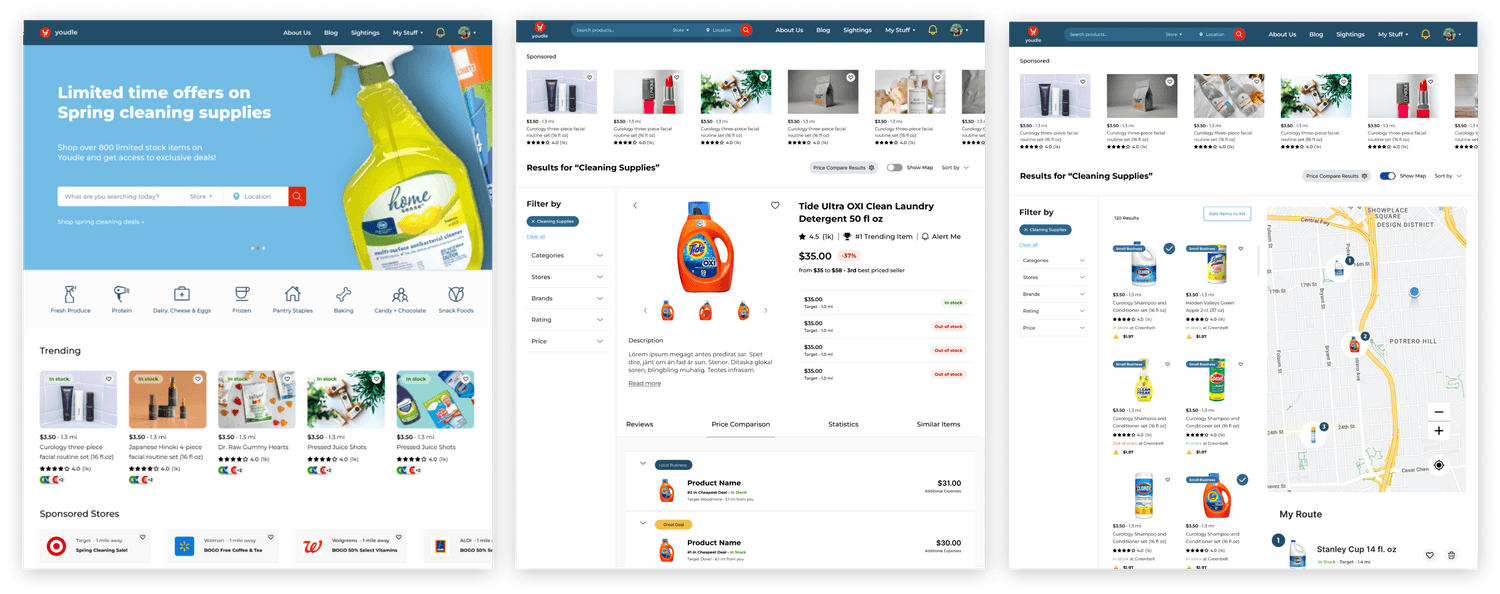
01
01

PRODUCT CONFUSION
PRODUCT CONFUSION
Every participant mistook the app for a retail store. The product had to explain itself before anything else could work.
Every participant mistook the app for a retail store. The product had to explain itself before anything else could work.
→
→
Onboarding added before the home screen. The tagline fix alone wasn't enough.
Onboarding added before the home screen. The tagline fix alone wasn't enough.
02
02
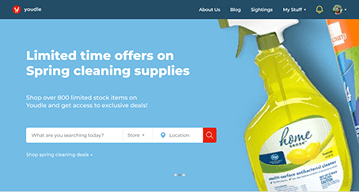
IMPORTANCE OF SEARCH
IMPORTANCE OF SEARCH
Once users understood Youdle, search was their immediate instinct every time. It needed to be the dominant UI element.
Once users understood Youdle, search was their immediate instinct every time. It needed to be the dominant UI element.
→
→
Search moved to top, full-width. Cart icon replaced with + to remove retail connotations.
Search moved to top, full-width. Cart icon replaced with + to remove retail connotations.
03
03
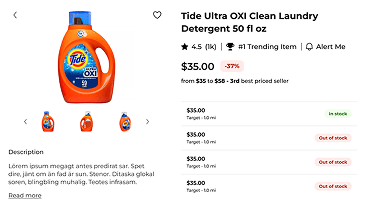
INVENTORY = TRUST
INVENTORY = TRUST
One parent drove to a store with 1 item listed. Shelf was empty. That single story made inventory count the most important element on the product page.
One parent drove to a store with 1 item listed. Shelf was empty. That single story made inventory count the most important element on the product page.
→
→
Stock status surfaced prominently on every store listing — not buried in the detail page.
Stock status surfaced prominently on every store listing — not buried in the detail page.
04
04
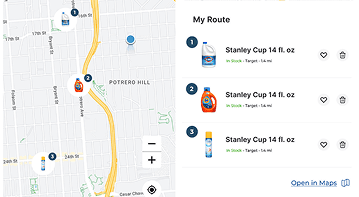
MAP ROUTE MISSING
MAP ROUTE MISSING
Users saw value in the map, but asked "and then what?" It needed to have an additional feature to help users move forward to continue using this app.
Users saw value in the map, but asked "and then what?" It needed to have an additional feature to help users move forward to continue using this app.
→
→
Map route suggested based on the products users save.
Map route suggested based on the products users save.
03 DESIGN: SEARCH & PRODUCT
Search Results Page
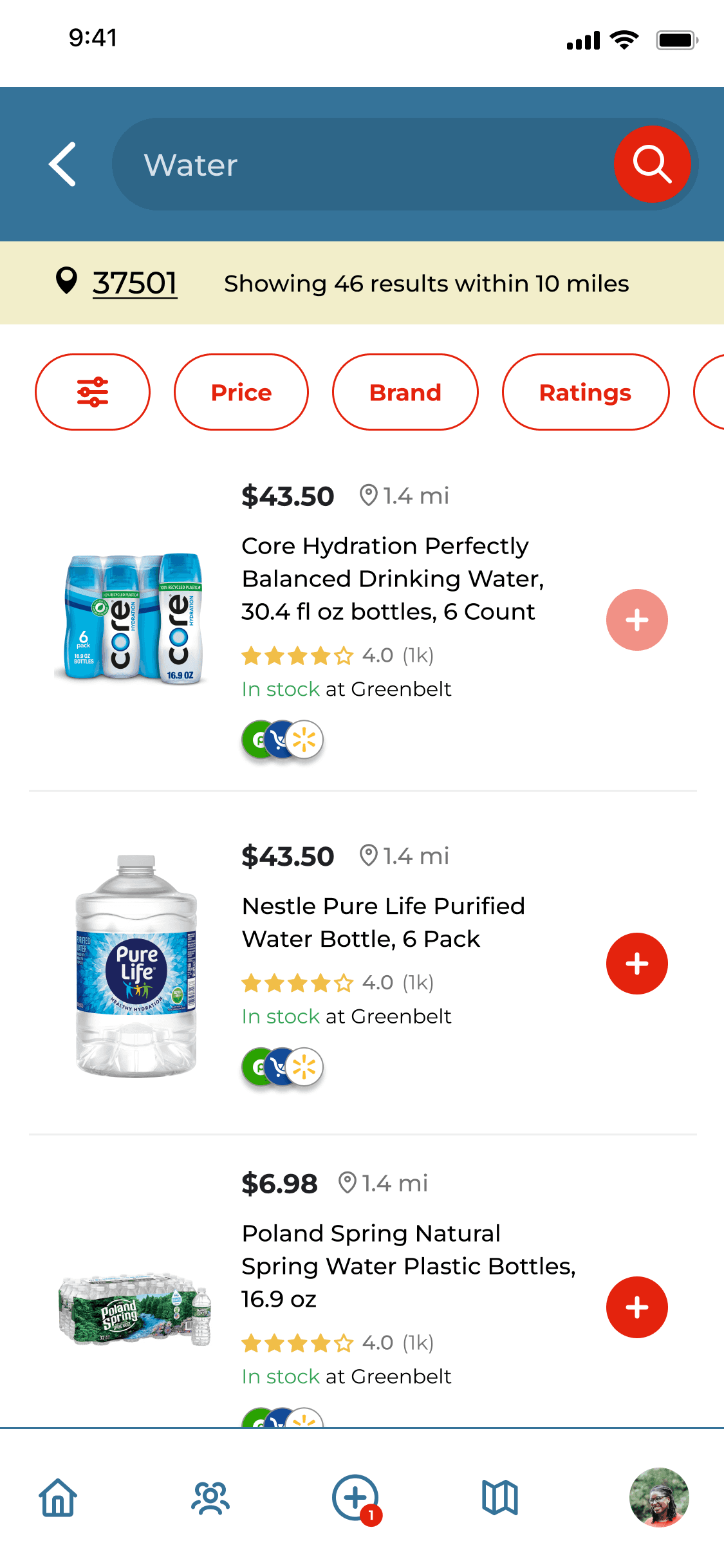
SEARCH BAR AT THE TOP
SEARCH BAR AT THE TOP
The + icon replaces a heart icon. Heart implied saving or favoriting. + implies adding to a list, an active, goal-oriented one.
The + icon replaces a heart icon. Heart implied saving or favoriting. + implies adding to a list, an active, goal-oriented one.
The + icon replaces a heart icon. Heart implied saving or favoriting. + implies adding to a list, an active, goal-oriented one.
LOCATION & RESULT COUNT
LOCATION & RESULT COUNT
Users know the data is local and real before they scroll.
Users know the data is local and real before they scroll.
Users know the data is local and real before they scroll.
IN STOCK AT A GLANCE
IN STOCK AT A GLANCE
Users don't need to open the product page to know if the trip is worth making.
Users don't need to open the product page to know if the trip is worth making.
STORE LOGOS AS WAYFINDING
STORE LOGOS AS WAYFINDING
Reduces clicks and supports faster trip planning.
Reduces clicks and supports faster trip planning.
IN STOCK AT A GLANCE
"In stock at Greenbelt" on every result card. Users don't need to open the product page to know if the trip is worth making.
STORE LOGOS AS WAYFINDING
Store brand dots show which stores carry the product — before tapping. Reduces clicks and supports faster trip planning.
Product Detail Page
Inventory-First Hierarchy
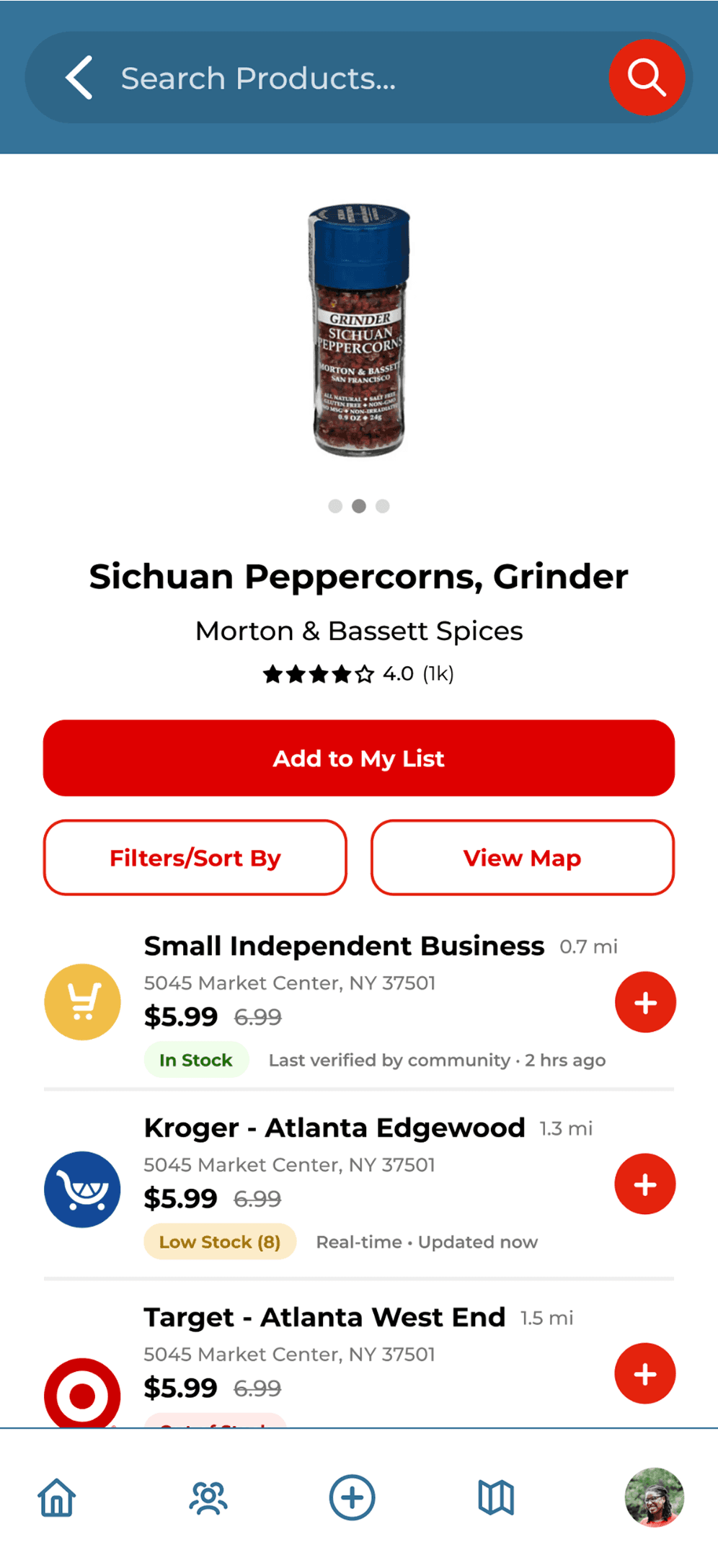
THREE STOCK STATES
THREE STOCK STATES
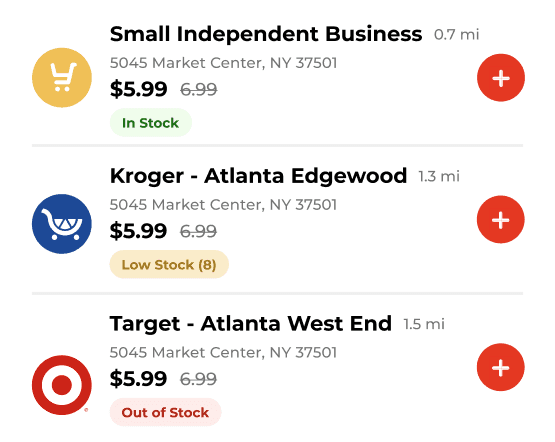
This design decision came from one parent's story. If the number in stock is wrong, the product fails at the only moment that matters.
This design decision came from one parent's story. If the number in stock is wrong, the product fails at the only moment that matters.
STORE COMPARISON ON ONE PAGE
STORE COMPARISON ON ONE PAGE
Price, distance, and stock status side by side. Users ranked availability first, price second.
Price, distance, and stock status side by side. Users ranked availability first, price second.
TIERED DATA CONFIDENCE
TIERED DATA CONFIDENCE
Users know exactly how much to trust each number before making the trip.
Users know exactly how much to trust each number before making the trip.
04 DESIGN: LIST & MAP
The feature stakeholders didn't ask for but users wanted.
The desktop experience showed available stores on a map, and planning happened off-screen. On mobile, users are already moving. They don't have the bandwidth to calculate the most efficient multi-stop order while driving. We proposed a recommended visit order built from the grocery list. Stakeholders saw the use case immediately.
The desktop experience showed available stores on a map, and planning happened off-screen. On mobile, users are already moving. They don't have the bandwidth to calculate the most efficient multi-stop order while driving. We proposed a recommended visit order built from the grocery list. Stakeholders saw the use case immediately.
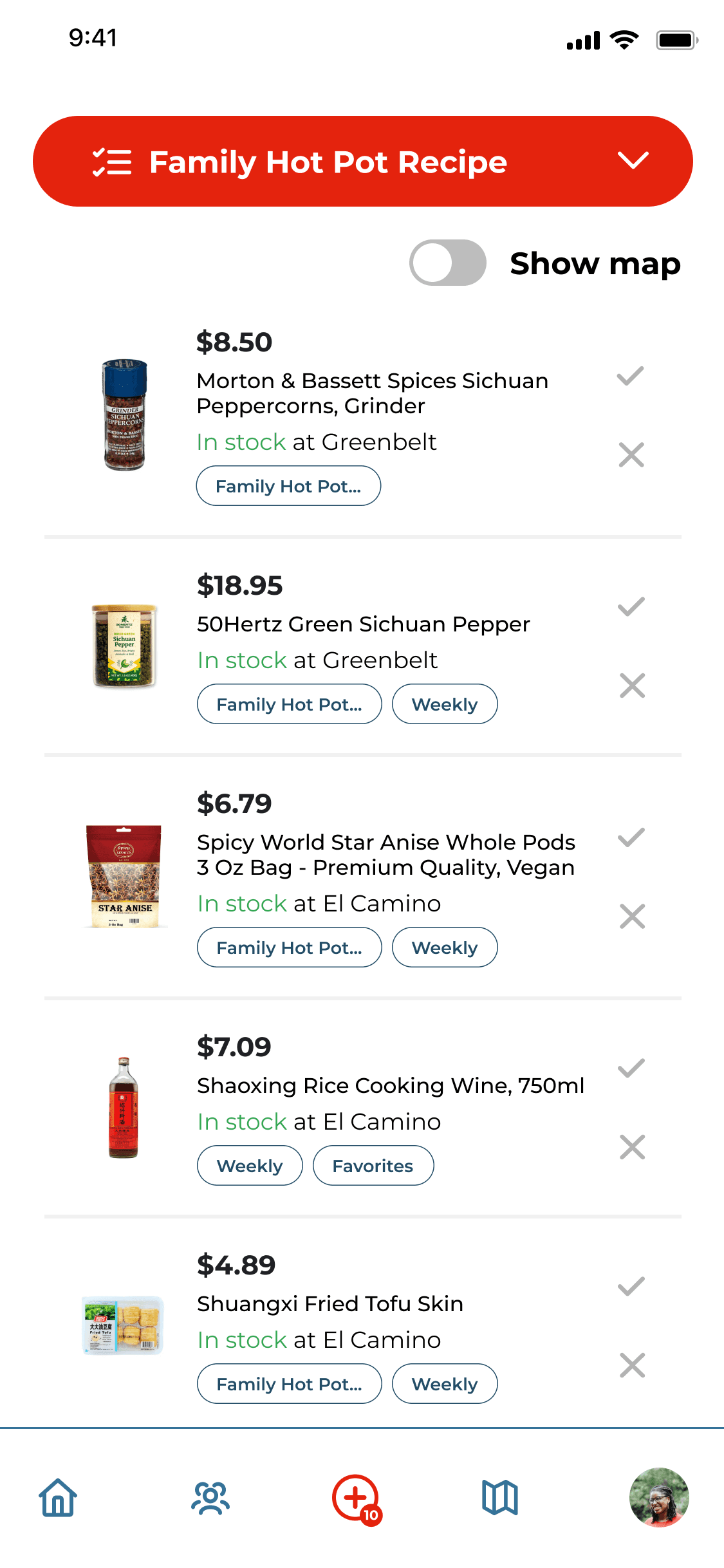
SHOW MAP TOGGLE
SHOW MAP TOGGLE
Map is accessible from the list.
Map is accessible from the list.
MULTIPLE LIST TYPES
MULTIPLE LIST TYPES
List is organized by occasion or habit. Recipe-based lists were especially valued for niche multi-item specialty trips.
List is organized by occasion or habit. Recipe-based lists were especially valued for niche multi-item specialty trips.
LIST TAG PILES
LIST TAG PILES
Items can belong to multiple lists simultaneously. A detail that came from understanding how parents actually shop.
Items can belong to multiple lists simultaneously. A detail that came from understanding how parents actually shop.
STOCK STATUS PERSISTS
STOCK STATUS PERSISTS
Users see if any item needs a store change before leaving.
Users see if any item needs a store change before leaving.
LIST TAG PILES
Items can belong to multiple lists simultaneously — Family Hot Pot, Weekly, Favorites. A detail that came from understanding how parents actually shop: the same staple item might appear on a recipe list and a weekly restock list at the same time.
STOCK STATUS PERSISTS
Users see if any item needs a store change before leaving — not when they arrive. The trust signal follows into the list.
Recommended Visit Order: Map View
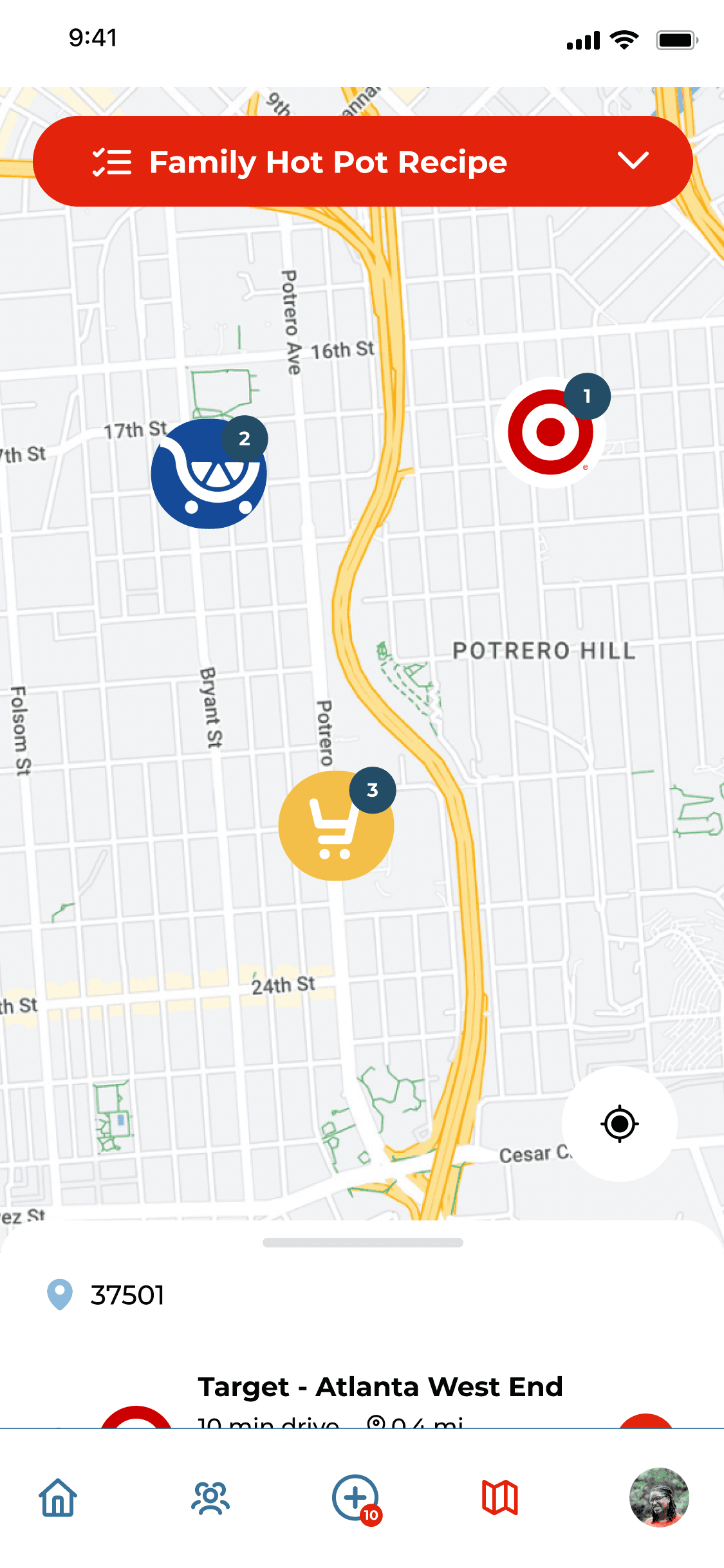
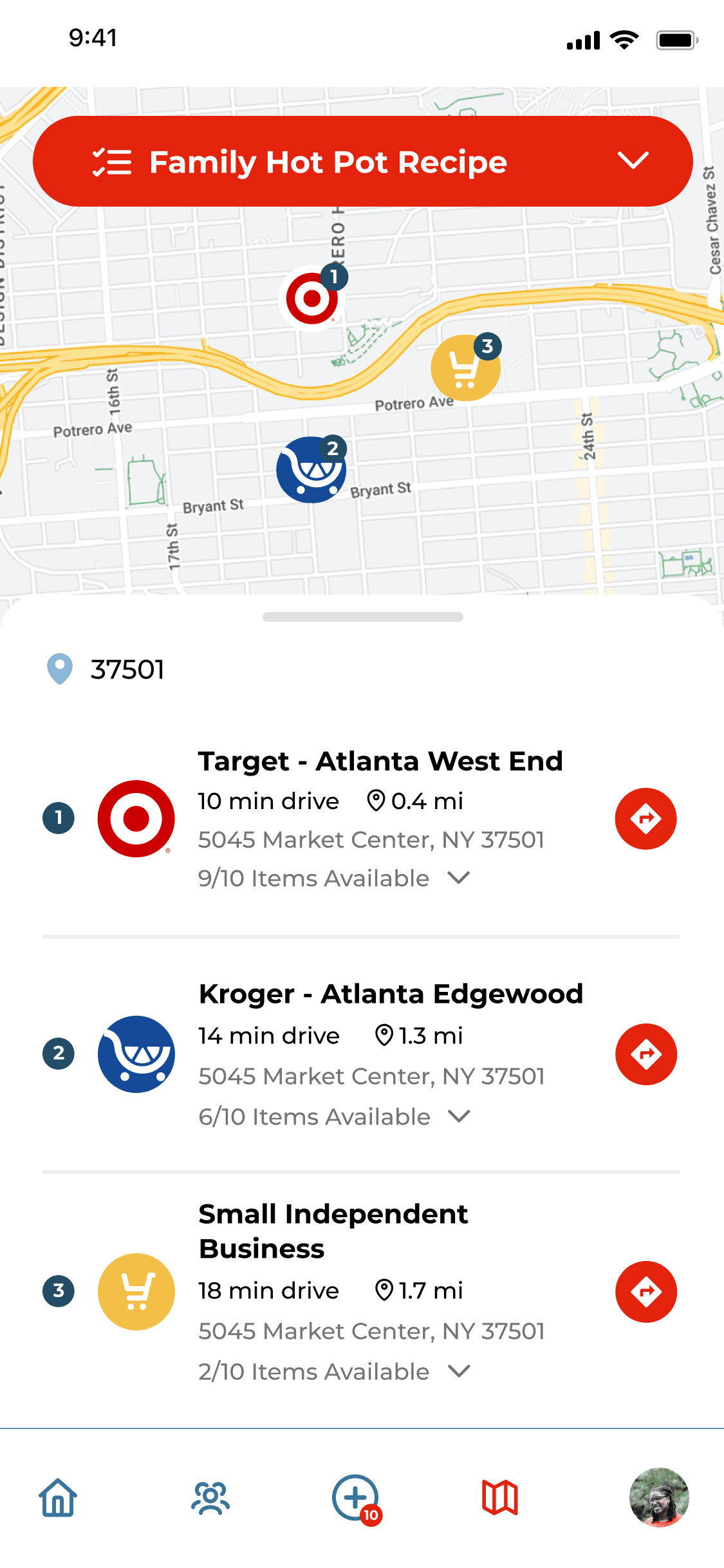
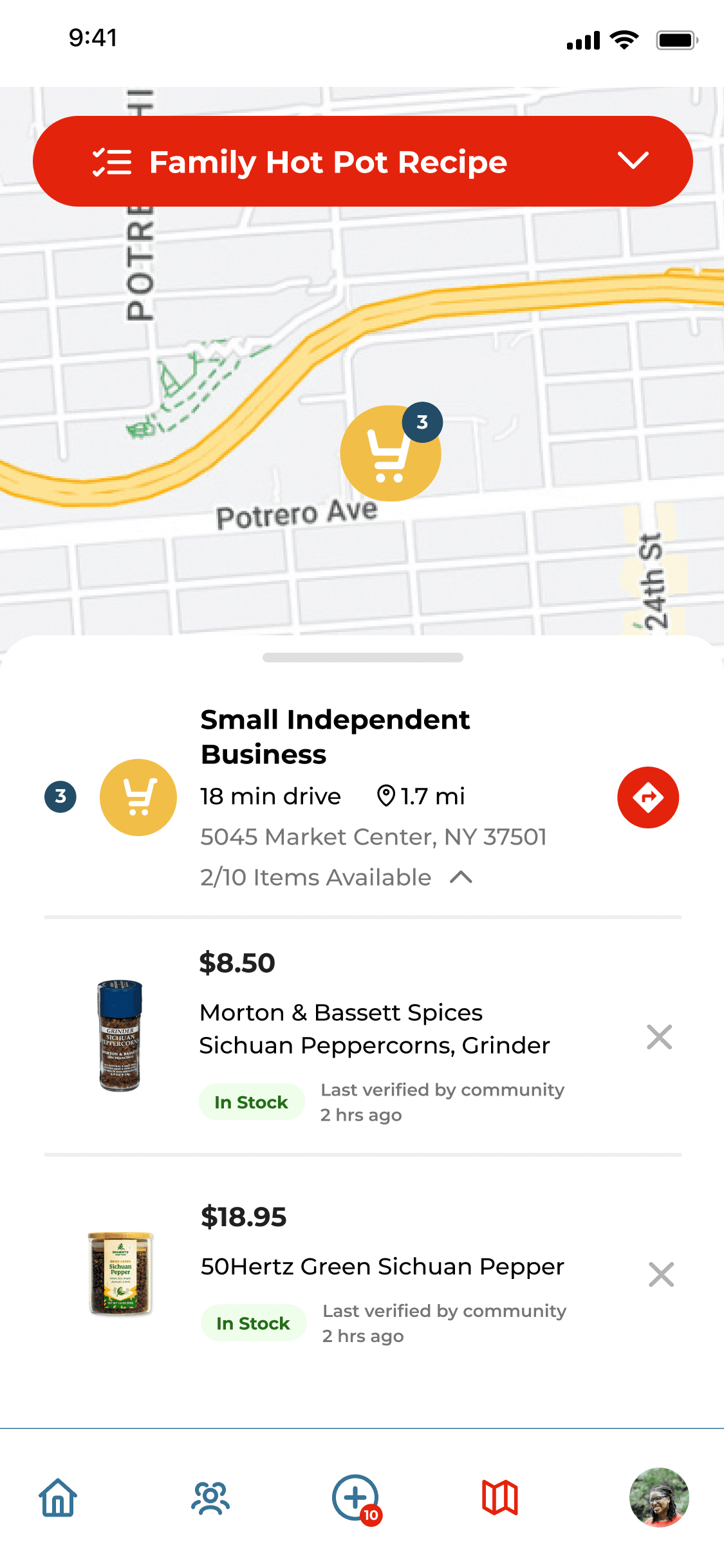
SPATIAL ORIENTATION
All three pins visible simultaneously. Users understand where everything is before committing to a route.
All three pins visible simultaneously. Users understand where everything is before committing to a route.
RANKED LIST
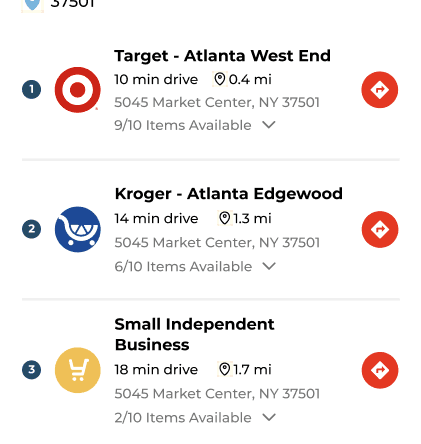
Target #1 (9/10), Kroger #2 (6/10), Small Independent #3 (2/10). The red arrow on each row hands off to native Maps — we decide the order, users navigate with the tool they already trust.
INVENTORY SIGNALS
"Small Independent Business" explicitly labels the store type. Items show "Last verified by community · 2 hrs ago" — the tiered data signal is consistent at every level of the experience.
UNDERSTANDING LOCATIONS
MAP ROUTE ORDER RANKED
INVENTORY SIGNALS
05 OUTCOMES
What the numbers confirmed.
We conducted two rounds of usability testing (one with lo-fi and one with hi-fi) with 6 participants each. Task completion and ease of use measured across search, add to list, view product, and map flows.
We conducted two rounds of usability testing (one with lo-fi and one with hi-fi) with 6 participants each. Task completion and ease of use measured across search, add to list, view product, and map flows.
+53%
+53%
+53%
Task Completion Rate
Lo-fi to hi-fi across all four core flows. Adding onboarding drove the single biggest jump.
Task Completion Rate
Lo-fi to hi-fi across all four core flows. Adding onboarding drove the single biggest jump.
Task Completion Rate
Lo-fi to hi-fi across all four core flows. Adding onboarding drove the single biggest jump.
3.8/5
3.8/5
3.8/5
Average NPS
Users cited single-page clarity and inventory visibility as standout features.
Average NPS
Users cited single-page clarity and inventory visibility as standout features.
Average NPS
Users cited single-page clarity and inventory visibility as standout features.
5/6
5/6
5/6
Understood the Product
After onboarding was added in, first-time user confusion dropped.
Understood the Product
After onboarding was added in, first-time user confusion dropped.
Understood the Product
After onboarding was added in, first-time user confusion dropped.
06 REFLECTIONS
What this project taught me.
Proactive features needed the right moment
The route feature wasn't in the brief. Through user testing and research, we learned that this is a feature that users want.
Proactive features needed the right moment
The route feature wasn't in the brief. Through user testing and research, we learned that this is a feature that users want.
Proactive features needed the right moment
The route feature wasn't in the brief. Through user testing and research, we learned that this is a feature that users want.
Engineering constraints
Real-time inventory for small businesses wasn't feasible. Understanding exactly why led to a tiered solution better than the original design.
Engineering constraints
Real-time inventory for small businesses wasn't feasible. Understanding exactly why led to a tiered solution better than the original design.
Engineering constraints
Real-time inventory for small businesses wasn't feasible. Understanding exactly why led to a tiered solution better than the original design.
Design critiques within the team
The ranking logic that makes the map feature work came from a teammate's question. Good critiques surface what one person misses.
Design critiques within the team
The ranking logic that makes the map feature work came from a teammate's question. Good critiques surface what one person misses.
Design critiques within the team
The ranking logic that makes the map feature work came from a teammate's question. Good critiques surface what one person misses.
07 WHAT I'D DO NEXT IF I HAD MORE TIME
Advance Ordering for Pickup
Multiple users asked if they could reserve an item ahead of arrival so securing the product and picking up experience is more seamless.
Advance Ordering for Pickup
Multiple users asked if they could reserve an item ahead of arrival so securing the product and picking up experience is more seamless.
Inventory Accuracy Feedback
A lightweight flag mechanism letting users report inaccurate stock. This can turn the community into a data layer that improves accuracy over time.
Inventory Accuracy Feedback
A lightweight flag mechanism letting users report inaccurate stock. This can turn the community into a data layer that improves accuracy over time.
Cynthia Rhee
©
2026